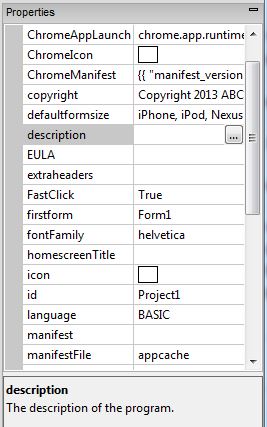
The project, its forms and the controls on those forms have information about them that can be edited in the Properties Window. Where such a change would affect the appearance of a form or control, the Design Screen will be updated.
Project Properties
| background image |
The background image on the screen. Default is a gray pattern with vertical lines.
|
| browserwarnmsg |
Message which appears is app is run on an unsupported browser. If blank, the warning does not appear.
|
| configxml |
Configuration information for PhoneGap Build. Includes things like icons, splash screens, autorotation (orientation) and more.
|
| copyright |
The copyright message. This will be placed in the generated code.
|
| defaultformsize |
Standard form size for most devices. If you want a size not on the list, set the height and width for each form in Form Properties.
|
| description |
Description of the project. Used in config.xml.
|
| extraheaders |
Additional lines to the header. This is a good place to include extra JavaScript libraries.
|
| firstform |
The name of the initial form to display. If left blank, the first form is used.
|
| globalfont |
The default font for all controls. Default value is Helvetica.
|
| HomescreenTitle |
The title to be used for the app when saved to the Home Screen on the device. iOS only.
|
| icon |
The icon to be used when the app is saved to the launcher. For iOS, it should be 114x114.
|
| id |
The saved name of the project.
|
| language |
BASIC or JavaScript. If BASIC, code is converted to JavaScript before running.
|
| manifest |
A list of files to be saved with the project. See “Distributing your App”.
|
| manifestFile |
“appcache” or “manifest”. “appcache” is recommended for all new projects.
|
| obfuscation |
Name of the external routine to obfucsate the runtime code.
|
| phonegapBuildID |
Build number returned by PhoneGap Build.
|
| splashscreen |
An image to display as the app is loading.
|
| splashscreen-iPad |
An image to display as the app is loading on an iPad.
|
| statusbar |
The appearance of the status bar at the very top of the screen. Choices are default, black or black-translucent.
|
| style |
The style used by the body of the app.
|
| title |
The public title of the program.
|
| version |
Version number of app. User specified.
|
| height |
The height of the form. You will want this to be the correct size for your device. The Design Screen uses this property.
|
| id |
The name of the form.
|
| left |
The position of the left of the form. Usually 0.
|
| method |
The http method used to send data. Can be GET or POST.
|
| onkeypress |
Function to call when a key is pressed in the form.
|
| onsubmit |
Function to call when a form is submitted to the server.
|
| openMode |
Should the form be opened on startup?
|
| style |
The style attributes for the form.
|
| top |
The position of the top of the form. Usually 0.
|
| URL |
The URL to send data to.
|
| width |
The width of the form. You will want this to be the correct size for your device. The Design Screen uses this property.
|
Code Module Properties
| id |
The name of the Code Module.
|
| Language |
The programming language used in the Code Module. Can be JavaScript or BASIC.
|
Next: Status Bar
